AI Agents

AI Memory in Customer Support

Explore the technology behind AI memory and context retention, learning how session databases personalization results in better, trust-filled client interactions.

May 5, 2026 11 min read By Waplix Team
Share:
AI Memory in Customer Support

Build Context-Aware Bots

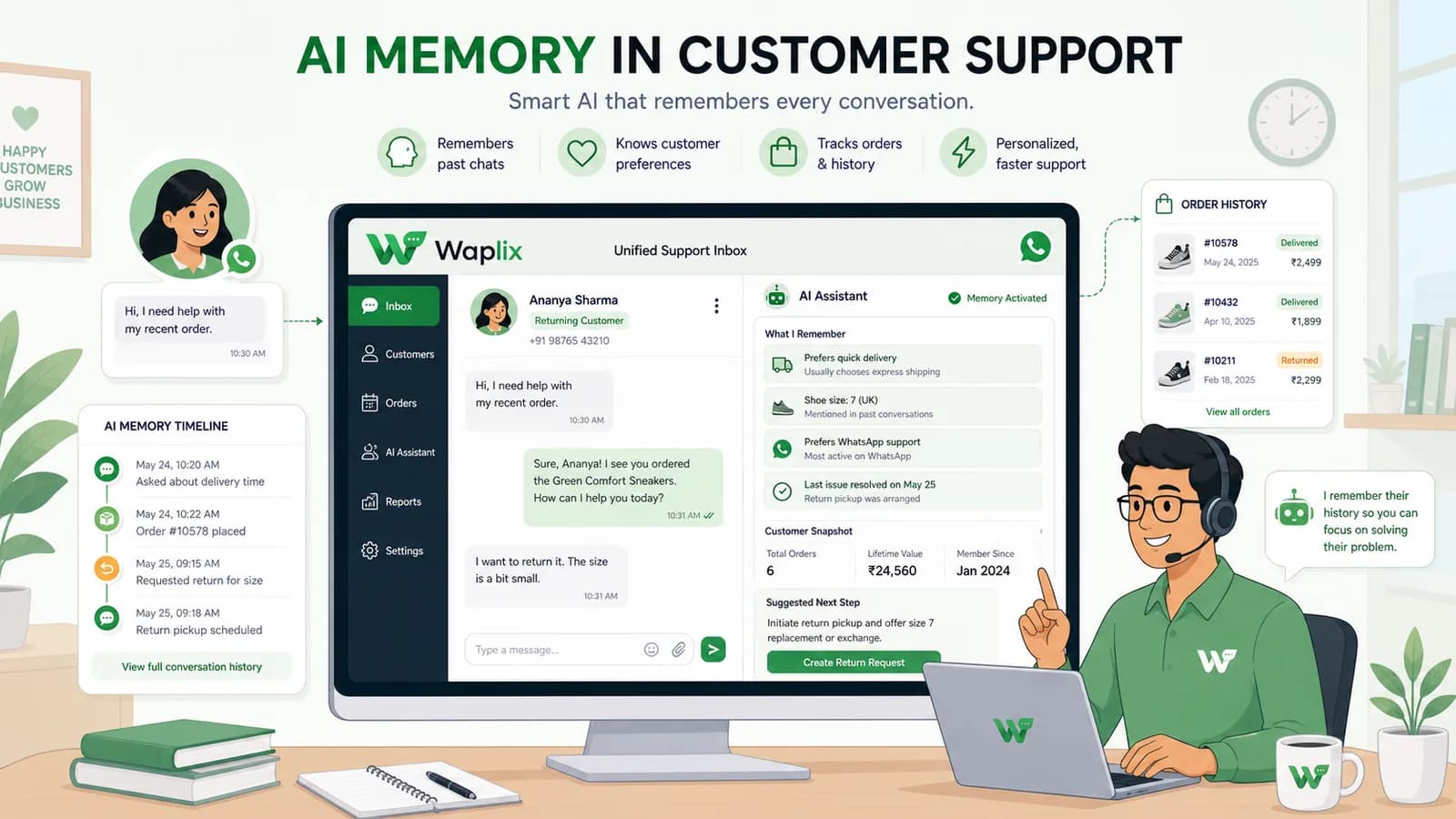
One of the most frustrating customer experiences is being forced to repeat details. When a user is transferred between support representatives or has a follow-up conversation the next day, they expect the business to remember who they are, what they bought, and what their issue is.

Legacy chatbots treat every inbound message as a isolated transaction. Modern conversational bots solve this through AI memory and context retention. By integrating database records and session history, agents converse like a human agent who has reviewed the folder beforehand.

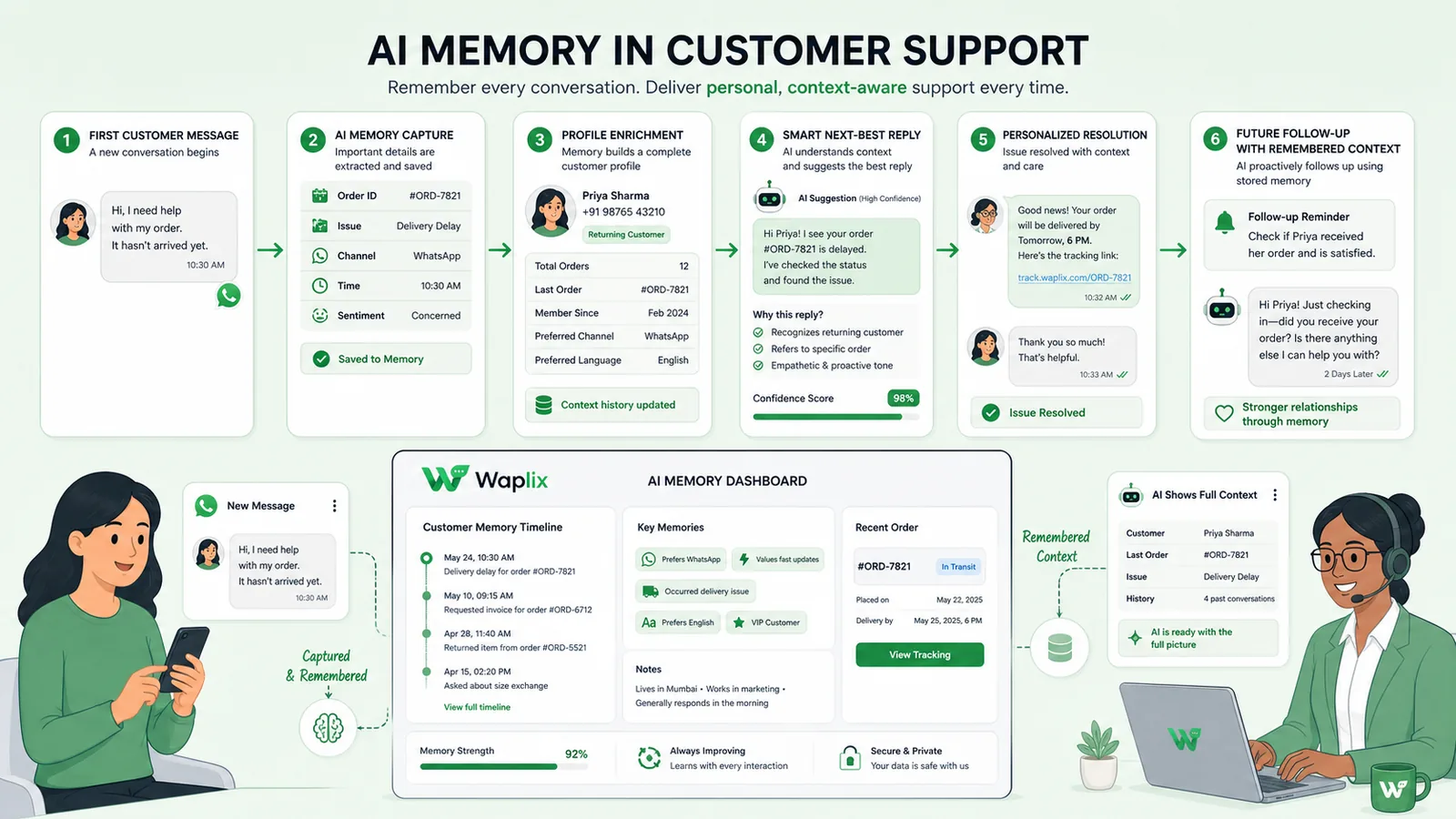
Overview: AI memory is built on three levels: short-term chat window buffers, persistent long-term database storage, and synced CRM properties.

Configure session stores and sync profiles using Waplix integrations and the active user dashboard.

Register Free Messages API
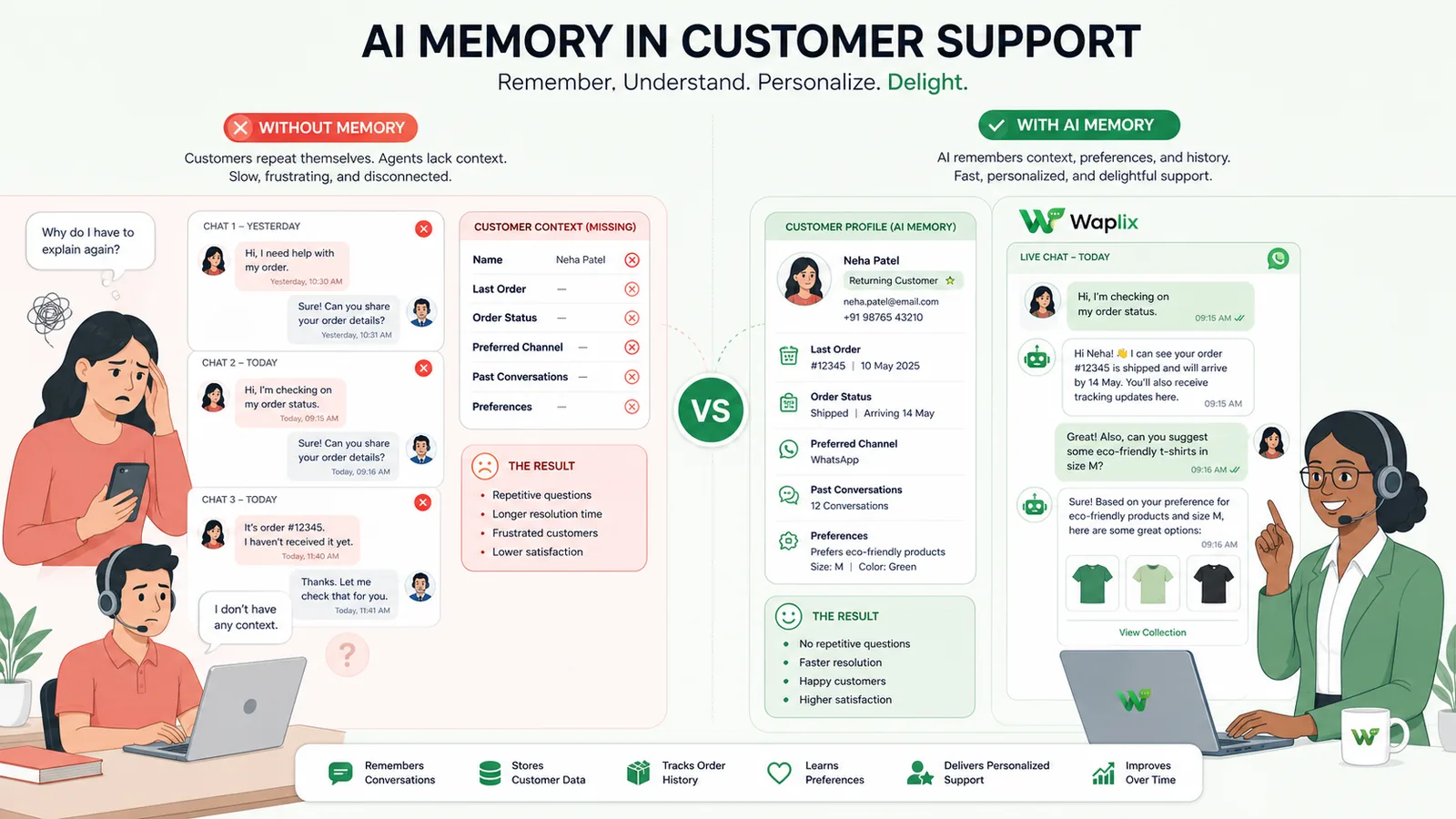
Transactional Chatbots vs. Contextual AI Agents

Analyze how memory-less systems compare to AI platforms with context retention features.

Feature Transactional (No Memory) Contextual (AI Memory)
Session Scope Resets on every message or after 15 mins Maintains thread timeline history permanently
CRM Mapping None (requires manual form submissions) Queries and updates profiles on the fly
Support Handover Abrupt (new agent has to ask everything again) Smooth (agent sees summaries and bot tags)
Objection Handling Repeats standard prompt template Adapts reply style based on user sentiment logs
Personalization Generic answers ("Hi User") Refers to products purchased previously

How AI Memory Processes Inbound Chats

Review the technical steps that occur when a contact messages a memory-enabled AI agent.

01

Identify Caller

Query number status to check if database has past conversation records.

02

Load Profile Variables

Retrieve CRM records, preference tags, and unresolved ticket variables.

03

Formulate Prompt Context

Inject retrieved parameters into the LLM system prompt envelope.

04

Synthesize Reply

Generate a response addressing the user's query in context of past chats.

05

Update Session Log

Save newly gathered details back to the customer profile registry.

Developer Integration: Fetching User Session Variables

Developers can fetch the structured context variables associated with a contact's phone session using the Waplix Sessions API.

GET /api/v1/sessions/context?phone=%2B15550198829
Authorization: Bearer YOUR_API_KEY
Accept: application/json

Response:
{
  "session_id": "sess_8849201",
  "contact": {
    "phone": "+15550198829",
    "name": "Sarah Connor"
  },
  "context_variables": {
    "verified_customer": true,
    "last_order_id": "ORD-99201",
    "support_tier": "VIP",
    "preferred_language": "en",
    "active_issues": ["delayed_delivery"]
  }
}

Data Retention Policies, Privacy & Compliance

Storing user conversation logs and profile parameters requires adherence to strict privacy standards. Under GDPR, users have the right to request deletion of their conversation files. AI agents must respect clear data purging guidelines.

Compliance Note: Ensure your support systems provide a straightforward mechanism for contacts to request data deletion.

Context Retention Features on Waplix

Waplix provides built-in tools to store and manage contact preferences, past chat sessions, and CRM profiles from a single dashboard.

Waplix Contact Profile and Metadata Settings

Interactive dashboard setting custom variables, system metrics, and customer notes.

Manage customer metadata and variable structures from the Waplix platform.
Shared Inbox Context Sidebar

Real-time inbox view highlighting contact logs, orders, and active bot sessions.

Representatives can see profile variables while chatting with clients.
Retention Analytics Dashboard

Track metrics on return customer rates, issue resolution times, and conversion paths.

Monitor support efficiency and customer retention trends.

Conclusion

AI memory transforms customer support interactions from repetitive transactions into relationship builders. Remembering buyer history and preference variables allows businesses to improve resolution rates and save team resources. Ensure your data retention policies respect privacy regulations.

Personalize Your Customer Support

Launch context-aware AI support, manage chat histories, and integrate your CRMs with Waplix.

Start for Free Contact Support

Frequently Asked Questions

AI memory is the ability of a conversational agent to store, recall, and apply information gathered during previous messages or interactions (like product preferences, verification status, or last order IDs) to make current conversations contextual.

Short-term memory refers to context retained within the active conversation window (e.g., remembering a name mentioned 3 messages ago). Long-term memory stores permanent details across months, such as account plans, preferences, or unresolved tickets.

Waplix logs all WhatsApp interactions and structures session variables. When the AI agent processes an incoming ping, Waplix retrieves the customer profile and appends it to the LLM prompt context automatically.

Yes. Waplix stores session databases using modern encryption standards, ensuring user data privacy and compliance with regulations like GDPR.

Yes. In the shared inbox, representatives can view active tags, user profile parameters, and session history stored by the AI, ensuring a smooth handoff process.

Related Guides & Insights

AI Appointment Booking on WhatsApp
AI Agents

AI Appointment Booking on WhatsApp

Learn how to build AI-driven booking systems on WhatsApp, connecting calendar databases to conversational agents, automating updates, and reducing client no-shows.

Read Article
AI Automation for Small Businesses
AI Agents

AI Automation for Small Businesses

Discover practical ways small businesses can leverage no-code AI automation on WhatsApp to manage customer conversations, qualify prospects, and coordinate bookings 24/7.

Read Article
AI Sales Agent Explained
AI Agents

AI Sales Agent Explained

Explore how AI sales agents work on WhatsApp. Learn to configure conversational bots that pitch products, handle objections, and generate payment checkouts seamlessly.

Read Article